Artplay - AI Photo & Video
- 4.5
- Rating
- 1.00M
- Installs
- Free
- Price

 Analysis by App-foxy
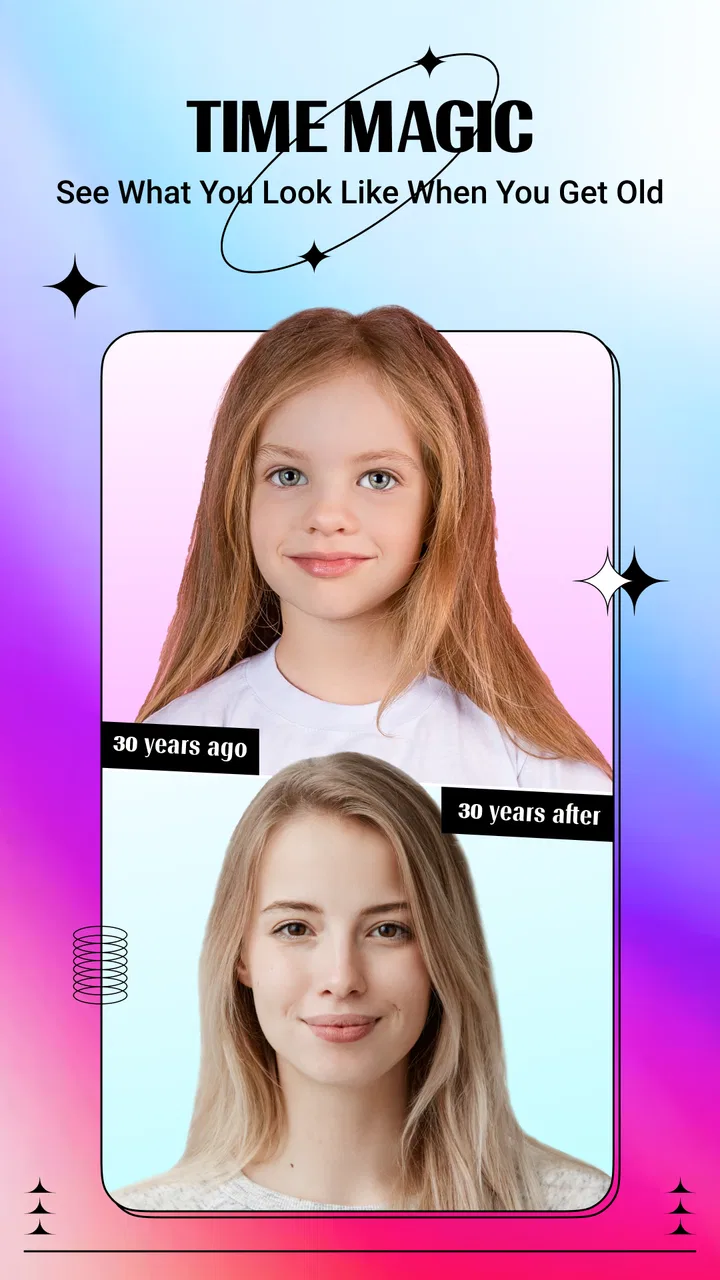
I spent time with Artplay - AI Photo & Video as a playful photography app rather than a serious editing suite, and that distinction matters from the first tap. Its appeal is simple: take an ordinary image, try an AI animal-face effect or an age-themed transformation, and see how differently the result changes the mood of the original photo. I found it most enjoyable when I treated the output as a quick experiment to share with friends, not as a carefully controlled portrait edit.
Developed by Hideaway Technology Limited, the app is free to install and aimed at Everyone. It has built a sizeable audience, with over one million installs and a 4.5 average from around seventeen thousand ratings. That combination suggests a polished enough experience for casual users, although the in-app purchase range, from $6.99 to $84.99 per item, means I would look closely at what is available before committing to anything paid.
How Artplay feels in everyday use
The first thing I noticed is that this is not trying to replace a conventional camera or a full photo editor. You are not opening it to correct white balance, retouch a landscape, or build a layered social graphic. The attraction is the transformation itself. The app takes a familiar face and turns it into something unexpected, which makes the process feel closer to a visual toy than a traditional photography workflow.
You May Also Like

 Blood Strike: 2.5 Anniversary
Blood Strike’s Loadouts Turn Every Drop Into a Tactical Gamble
A close look at Blood Strike’s custom loadouts: how fast access to signature weapons reshapes its battle royale rhythm, rewards preparation, and narrows the gap between fights.

 Pandora - Music & Podcasts
Pandora’s Music Is Easy to Start, but Harder to Recover
Pandora’s strength is its low-effort path from a seed to a station. Its weak spot is how much confidence it asks you to place in connection, setup, and quiet recovery.

 8 Ball Pool
 Is Built on Rivalries, Rematches, and Routine
A close look at the rivalries, rematches, shared routines, and unanswered safety questions that turn a quick pool match into a persistent mobile community.

 Samsung Music
’s Quiet Strength Is Playing What You Already Own
Its reach comes less from spectacle than from dependable access to a personal library. That simplicity is both the app’s strongest retention engine and its ceiling.

 AccuWeather: Weather Radar
AccuWeather Review: A Quick, Clear Forecast for Everyday Decisions
For everyday plans, the best forecast is the one you can understand quickly. AccuWeather makes rain timing, radar, and local conditions easy to act on, with a few trade-offs.

 Hill Climb Racing
Why Hill Climb Racing Still Turns Crashes Into One More Run
A tiny car, a bumpy hill and one more upgrade: Hill Climb Racing keeps resurfacing because its simple chaos makes every near-miss feel personal.
More From Our News Desk
View All News


That focus makes the learning curve pleasantly short. A friend who is not comfortable with editing tools can understand the basic idea almost immediately: choose an image, select a style or test, wait for the processing, and inspect the result. I did not need to learn a timeline, brush system, masking workflow, or complicated export setup to get started. For a quick laugh in a group chat, that simplicity is more valuable than a long feature list.
The strongest use case is a small social moment. Imagine taking a family photo during a quiet evening, applying an animal-face treatment to everyone, and comparing the results on the sofa. The fun comes from the contrast between the original image and the altered one. I also found the age-themed concept useful for a light conversation starter, especially when people understand that the result is entertainment rather than a prediction or a meaningful assessment.
That last point is important. I would not use an AI transformation as evidence of how somebody will actually look in the future, nor would I treat an animal resemblance as an objective reading of a person’s face. The output is a creative interpretation. Keeping that expectation in place makes the app much more enjoyable and avoids asking it to provide accuracy it was never designed to deliver.
Speed expectations before you start
The experience feels quick when I approach it with the right expectations. This is not the kind of app where every adjustment appears instantly like a brightness slider. AI image processing naturally changes the rhythm: I choose an effect, submit the image, and give the app a moment to produce the result. For me, that pause is part of the experience rather than a problem, because the anticipation is tied to the surprise of seeing the finished transformation.
Processing speed can also feel different depending on the image I choose and the device I am using. A simple portrait with a clearly visible face is a more sensible starting point than a distant subject, a dark snapshot, or a crowded group scene. If the face is partly hidden by a hat, hair, or another person, I would not judge the app too quickly from one disappointing result. The input itself has a major influence on how convincing an AI effect can appear.
My practical advice is to prepare a few suitable photos before beginning a session. I look for a reasonably bright image, a face that is not tiny in the frame, and an angle that is easy to read. This reduces wasted attempts and makes the app feel more responsive because I am giving it material that matches its purpose. It is a small workflow change, but it improves the experience more than repeatedly pressing the same effect on a difficult photo.
The current version is 1.8.3, and the app supports devices running Android 5.0 or later. That broad compatibility is helpful for people who do not own a recent phone, but it also means performance expectations should remain realistic. A newer device may feel more comfortable during image processing, while an older model may make the waiting period more noticeable. I would not install it expecting every handset to behave identically.
What happens during heavier sessions
One quick transformation is easy to understand. A longer session is more revealing. If I keep trying different looks on several photos, the app becomes less like a single joke and more like a small batch-processing activity. That is where I pay attention to how much patience I have, how warm the phone becomes, and whether I still enjoy comparing results after the novelty fades.
For occasional use, I think the workload is reasonable. The app’s purpose is naturally suited to short bursts: test an image, save or share the version you like, then move on. I would be less enthusiastic about using it for a large personal archive or a full album makeover. That kind of project would demand a predictable editing pipeline, clear organization, and more control than this playful format is meant to provide.
A useful trick is to decide what you want from each attempt before processing it. If I am testing an animal effect, I choose one or two photos where the face is expressive. If I am exploring an age-related effect, I compare the result with the original instead of immediately running many random images. This keeps the session focused and avoids turning the app into a repetitive cycle of taps and waiting.
Group photos are another heavy-use situation in a practical sense, even if the processing itself is not visibly demanding. More faces create more opportunities for uneven results. One person may look convincing while another appears distorted or receives an effect that does not match the expression. I therefore treat group images as a fun extra rather than the safest way to demonstrate the app. Individual portraits generally give me a clearer basis for judging the transformation.
I would also avoid starting a long session when my phone is already busy with other demanding tasks. That is not a criticism unique to this app; it is simply sensible when working with image effects. Closing unrelated apps, keeping the original photos available, and making sure there is enough free storage for the images I want to keep can prevent avoidable frustration. These habits matter more than chasing a particular processing time that may vary from device to device.
Reliability, results, and recovery
Reliability here is not only about whether the app opens. It is also about whether the result feels usable after the transformation. In my experience, the most dependable outcomes come from photos with a clear subject and uncomplicated lighting. When the source is ambiguous, I see the AI effect as a gamble. That variability is part of the format, but it means I would keep the original image and avoid treating any single generated version as precious.
That original-first habit is my most important recovery tip. I never regard the transformed image as a replacement for the source. I keep the untouched photo, review the altered version separately, and only share the result after checking faces, edges, and the overall expression. If an output looks strange, recovery is simple: return to the original and try a different image or style. The process is much less frustrating when an unsuccessful attempt is treated as disposable.
There is also a social reliability question. An effect can be technically successful while still being unsuitable for the person in the photo. I would ask before transforming and sharing somebody else’s face, especially if the result makes them look older, animal-like, or otherwise unusual. The app is designed for amusement, but consent and context still matter. A private joke between friends is different from posting an unflattering edit publicly.
The app’s rating and install base give me confidence that it is not an obscure experiment with no audience, but they do not guarantee that every effect will work equally well for every face. I read the 4.5 average as a sign of broad satisfaction with the concept, not as proof of perfect consistency. AI effects are judged visually, and visual quality is subjective. One person may love an exaggerated result that another person considers unusable.
When a result disappoints me, I change one variable at a time. I try a better-lit photo before blaming the effect, then test a different expression or crop. This makes it easier to understand whether the issue came from the source image or from the chosen transformation. It is a more useful approach than repeatedly submitting the same difficult portrait and concluding that the whole app is unreliable.
Device limits and the cost of convenience
The minimum operating-system requirement of Android 5.0 makes the app accessible to a wide range of Android users. Still, minimum compatibility should not be confused with identical performance. Older hardware may have less comfortable image processing, and limited storage can make any photo-focused app harder to live with. Before a large creative session, I would check that the phone has room for the originals and the edited copies I intend to retain.
Battery awareness is sensible too. I would use the app casually when the phone is low on charge rather than planning a long transformation session away from a charger. The app’s value comes from short creative experiments, so there is little reason to push a device through dozens of attempts at once. A few carefully chosen photos usually tell me more than an unfocused marathon.
Privacy and sharing deserve a deliberate approach whenever faces are involved. I choose images that I am comfortable processing and sharing, and I review the final picture before sending it anywhere. I would be especially careful with children’s photos or images containing people who did not ask to be edited. The app is rated Everyone, but that age classification does not remove the need for sensible choices about personal photographs.
The free entry point is convenient for trying the core idea, yet the in-app purchase range changes how I evaluate the app over time. I am happy to explore before paying, but I would not assume that every desirable option is included at no cost. Anyone installing it mainly for one specific effect should first confirm how that effect is presented in the app. That simple check can prevent disappointment and makes the free-versus-paid decision more informed.
For users on iOS, I would verify the current availability and device requirements in the relevant store before planning a workflow, rather than assuming that an Android installation experience transfers directly. On Android, the stated support begins at version 5.0. In either case, the practical question is whether the phone handles image processing comfortably and whether the user is satisfied with the available free experience.
Where it beats ordinary photo apps
Compared with a standard camera app, this is much more entertaining after the photo has already been taken. A camera gives me control over capture; Artplay gives me a playful reason to revisit an ordinary portrait. Compared with a conventional editor, it removes most of the manual work. I do not have to spend several minutes selecting facial areas or building an effect from individual adjustments.
That convenience is also the trade-off. Manual editing apps are better when I want a predictable result, precise skin retouching, a controlled color grade, or a professional-looking composition. A social design app is better for adding text, arranging several images, or preparing a post with a specific layout. Artplay is the better choice when the transformation itself is the point and a little unpredictability adds to the fun.
I would also choose a conventional editor for photographs that matter emotionally or professionally. A wedding portrait, a work profile image, or a carefully composed travel shot deserves tools that preserve the photographer’s intent. This app is strongest with low-pressure images where experimentation is welcome. Its limitations become obvious when I need precision, repeatability, or a polished result that looks deliberately designed rather than algorithmically transformed.
One non-obvious strength is how well it can revive photos that would otherwise remain forgotten. I have plenty of ordinary portraits that are technically fine but not interesting enough to revisit. A playful transformation gives them a second life without requiring a new photo shoot. That makes the app useful for a quiet evening, a birthday message, or a quick conversation starter when I want something more personal than a generic sticker.
Another trade-off is that the app encourages reaction more than refinement. I am usually responding to the surprise of an output, not improving a picture through a series of controlled decisions. That is perfect for sharing a funny result, but less satisfying for someone who enjoys the craft of editing. Knowing which kind of creator you are will tell you more about the app’s value than its rating alone.
Who should install it
I would recommend it to casual photographers, families, and friends who enjoy face-based visual jokes. It is also a good fit for someone who finds traditional editing intimidating but wants to do something creative with existing photos. The free starting point lowers the barrier to experimentation, and the Everyone rating makes the concept approachable for a broad audience, with the usual need for adult guidance around sharing personal images.
I would skip it if my main goal is a professional camera workflow, detailed retouching, reliable identity-preserving edits, or a large organized photo project. I would also skip it if I dislike waiting for AI processing or if I want every result to look natural. The app’s charm depends on accepting that some transformations will be amusingly strange, and that is not a good match for every photography habit.
My best workflow is deliberately small: choose a clear portrait, keep the original, test one transformation, inspect the face and edges, and share only the version that feels appropriate. I then stop when the results begin to feel repetitive. This approach protects the phone’s resources, avoids unnecessary purchases, and keeps the app in its strongest role as a quick creative break.
Overall, I see Artplay - AI Photo & Video as a lightweight entertainment-focused photography app with a clear personality. Its speed is most comfortable in short sessions, its reliability improves with good source images, and its device demands are easier to manage when I avoid processing large batches. The current version, 1.8.3, gives Android users on 5.0 or later a straightforward way to try the concept without beginning with a paid commitment.
My final verdict is positive but specific: install it if you want fast, surprising face transformations and understand that the results are creative interpretations, not precise predictions. Keep your expectations modest, protect the original photos, and check the cost of any locked options before buying. For a spontaneous laugh with friends, it earns a place on my phone; for serious editing, I would reach for a more controlled alternative instead.
FAQs for Artplay - AI Photo & Video
01What is Artplay - AI Photo & Video and what does it offer?
Artplay - AI Photo & Video is a creative app that leverages AI technology to enhance your photos and videos. It offers a variety of filters and editing tools that allow users to transform their media into artistic creations. It's suitable for both casual users and professionals looking to add a creative touch to their content.
02How user-friendly is the Artplay app for beginners?
Artplay is designed with an intuitive interface that's easy to navigate, making it accessible for beginners. The app provides step-by-step guides and tutorials to help new users get started quickly. Its user-friendly design ensures that even those with minimal editing experience can create stunning visuals.
03What are the main features of Artplay?
Artplay offers a wide range of features, including AI-enhanced filters, customizable effects, and advanced editing tools. Users can adjust colors, apply artistic styles, and use the app’s unique AI capabilities to transform ordinary photos and videos into works of art. The app also supports high-resolution exports.
04Are there any in-app purchases or subscriptions required?
While Artplay offers a free version with basic features, it also includes in-app purchases and subscription options for users who want access to premium features. These may include exclusive filters, additional editing tools, and ad-free usage. Users can choose the package that best suits their needs.
05Is Artplay available for both Android and iOS devices?
Yes, Artplay is available for download on both Android and iOS platforms. Users can easily find the app on the Google Play Store for Android devices and the Apple App Store for iOS devices. The app is optimized for a wide range of devices, ensuring a smooth user experience across platforms.
Pros
- User-friendly interface
- easy to navigate.
- Wide range of AI filters for creativity.
- Fast processing of photos and videos.
- Regular updates with new features.
- Compatible with most devices.
Cons
- Some filters require premium subscription.
- Occasional crashes on older devices.
- Limited offline functionality.
- Ads can be intrusive at times.
- High battery consumption during use.

Artplay - AI Photo & Video
Gallery